
Cantaloupe Play Account Deletion Steps
In order to delete your account with Cantaloupe Play, please follow the steps below
Step 1:
Please login to the Cantaloupe Play Mobile App or Portal with your User ID and Password
Step 2:
Once you login to the dashboard, Right at the top click on if using the mobile app. If using the web portal click on your email at the top right of the screen. This will bring down a menu that includes an option for "Request Deletion Account". Please click on that option. "Request Deletion Account"
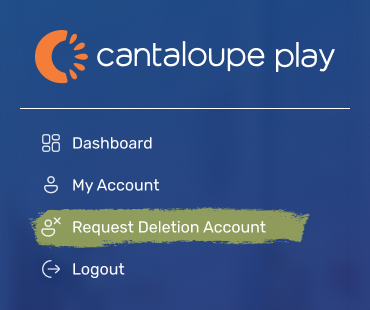
Step 3:
Once you click Request Deletion of My Account, a pop up will display confirming you want this done. Once you click confirm, you can not go back or cancel this request.
Contact Us
If you have any questions, please speak to the staff onsite. For emergency support please emailcustomerservice@cantaloupe.com